Microsoft Copilot Studio Licensing: Everything You Need to Know
Microsoft Copilot Studio Licensing: Everything You Need to Know
Licensing Guide
A comprehensive guide to understanding Copilot Credits, subscription options, and how to get started with building AI-powered agents.
Updated: November 2025 | 10 min read | Microsoft Power Platform
Quick Links
- Official Licensing Guide - Download the complete PDF
- Usage Estimator - Forecast your Copilot Credits
What is Microsoft Copilot Studio?
Microsoft Copilot Studio is a comprehensive conversational AI platform that empowers users to build, customize, and deploy agents using natural language or a graphical interface. Whether you're creating customer service bots, internal assistants, or specialized AI agents, Copilot Studio provides the tools to design, test, and publish solutions tailored to your specific needs.
Key Features:
- Natural Language Building - Create agents using conversational prompts
- Multi-Channel Publishing - Deploy to Teams, web, and external channels
- 1200+ Connectors - Connect to any data source
- Generative AI Powered - Built on advanced LLM technology
Understanding Copilot Credits
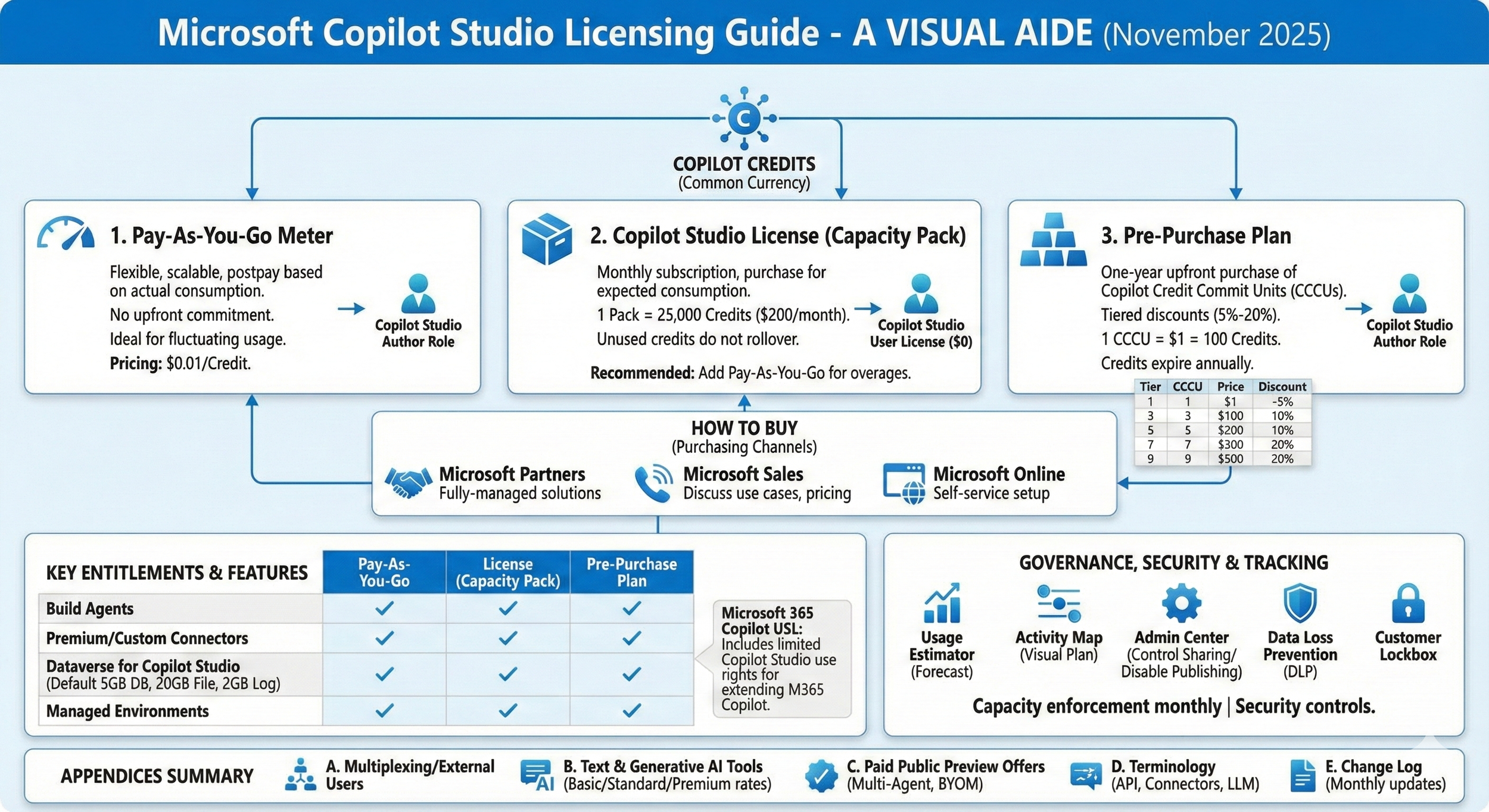
At the heart of Copilot Studio licensing is the concept of Copilot Credits, the common currency across all Copilot Studio capabilities. When users interact with agents or when agents perform tasks on behalf of users, they consume these credits.
The number of credits consumed for each response or action depends on the complexity of the task completed by the agent, including retrieving information, responding to prompts, executing workflows, and invoking AI tools.
Key Insight: Copilot Credits provide flexibility. You pay based on the actual work your agents perform, not per user or per conversation.
Three Ways to Purchase Copilot Studio
1. Pay-As-You-Go Meter
$0.01/credit
Postpay based on actual consumption with no upfront commitment. Perfect for unpredictable workloads.
- No upfront license required
- Scale with demand
- Billed monthly in arrears
- Ideal for seasonal usage
2. Subscription License (Recommended)
$200/pack/month
Pre-purchase capacity packs for predictable monthly usage. Each pack includes 25,000 Copilot Credits.
- 25,000 credits per pack
- Predictable monthly costs
- Annual billing available
- Pair with pay-as-you-go for overages
3. Pre-Purchase Plan
Up to 20% off
One-year upfront purchase with tiered discounts. Buy Copilot Credit Commit Units (CCCUs) worth $1 each = 100 credits.
- 5% to 20% tiered discounts
- Pool of credits for the year
- Maximum flexibility
- Best for enterprise scale
Best Practice: Microsoft recommends setting up the pay-as-you-go meter alongside subscription licenses to ensure business continuity and prevent service interruptions due to overages.
Pre-Purchase Plan Tiers
The Copilot Credit Pre-Purchase Plan offers significant savings at higher volumes. Here's how the discount tiers break down:
| Tier | Commit Units (CCCU) | Copilot Credits | Price | Discount |
|---|---|---|---|---|
| 1 | 3,000 | 300,000 | $2,850 | 5% |
| 2 | 15,000 | 1,500,000 | $14,100 | 6% |
| 3 | 30,000 | 3,000,000 | $27,900 | 7% |
| 5 | 300,000 | 30,000,000 | $270,000 | 10% |
| 9 | 3,000,000 | 300,000,000 | $2,400,000 | 20% |
Microsoft 365 Copilot Integration
If your organization already uses Microsoft 365 Copilot ($30/user/month), you have access to limited Copilot Studio capabilities at no additional charge. This includes:
- Create agents for Microsoft 365 Copilot
- Publish to Teams and SharePoint
- Use standard and premium connectors
- Fair usage limits apply
Important: Publishing to external channels (web, Facebook, WhatsApp, etc.) requires a standalone Copilot Studio subscription.
Dataverse Storage Included
Every Copilot Studio tenant license includes default Dataverse capacity for storing agent data:
| Capacity Type | Default Included | Add-on Price |
|---|---|---|
| Dataverse Database | 5 GB | $40/GB/month |
| Dataverse File | 20 GB | $2/GB/month |
| Dataverse Log | 2 GB | $10/GB/month |
New in November 2025
The latest licensing guide includes several important updates:
- Code Interpreter (GA) - Execute Python code for analytics and data visualization
- Computer Use (GA) - Agents can now interact with desktop applications
- AI Tools Rename - AI Builder capabilities now called Copilot Studio AI Tools
Getting Started
Ready to build your first agent? Here's how to get started:
- Sign up for a free trial at copilotstudio.microsoft.com
- Estimate your usage with the Agent Usage Estimator
- Choose your licensing model based on your organization's needs
- Build and publish agents to your preferred channels
This guide has been updated for November 2025 - Reflecting the latest changes to Microsoft Copilot Studio licensing, including Code Interpreter and Computer Use general availability.
Copyright 2025 Microsoft Corporation. All rights reserved.
For complete licensing details, refer to the official Microsoft Copilot Studio Licensing Guide.
Enjoyed this article?
Share it with your network
Comments (0)
Sign in to join the conversation
Sign In to CommentNo comments yet. Be the first to share your thoughts!